Interactive World Travel Map
About the Project
Travel Agent was my graduation project, built with a team during my final year at university. The goal was to make trip planning feel like exploring rather than researching — instead of juggling a dozen tabs, a traveller picks a country and gets everything in one place: general information, famous attractions, a live currency converter, seasonal weather, travel-risk and news, flight booking, and a traveller community.
The front door to all of that is the interactive world map. It answers the very first question every traveller asks — ”where can I actually go with my passport?” — and turns the answer into a single glance at a colour-coded globe. Every country on the map is a doorway into its full destination guide.
This page focuses on the feature I personally designed and built from scratch: the interactive map experience end to end — the visuals, the interaction model, and the data pipeline behind it.
My Role & Contribution
I owned the map feature from concept to working component. That meant designing how visa information should look on a map, building the rendering and interaction layer in plain JavaScript, and — the unglamorous but critical part — wrangling the raw passport dataset into something a browser can query instantly.
01Map experience design
Defined the six-state colour language, the legend, the hover tooltip, and the country side-panel so ~200 countries stay readable at once.
02Visa data pipeline
Turned a 35,000-row passport-index CSV into a pre-compiled lookup object with O(1) passport → destination access, no runtime parsing.
03Country reconciliation layer
Built the name ↔ ISO bridge that reconciles three different country-naming schemes (dataset, SVG map, REST Countries) so nothing renders grey by accident.
04Interaction & enrichment
Wired the map hooks: hover, recolour-on-select, click-to-open, and live country enrichment from the REST Countries API.
What the Interactive Map Does
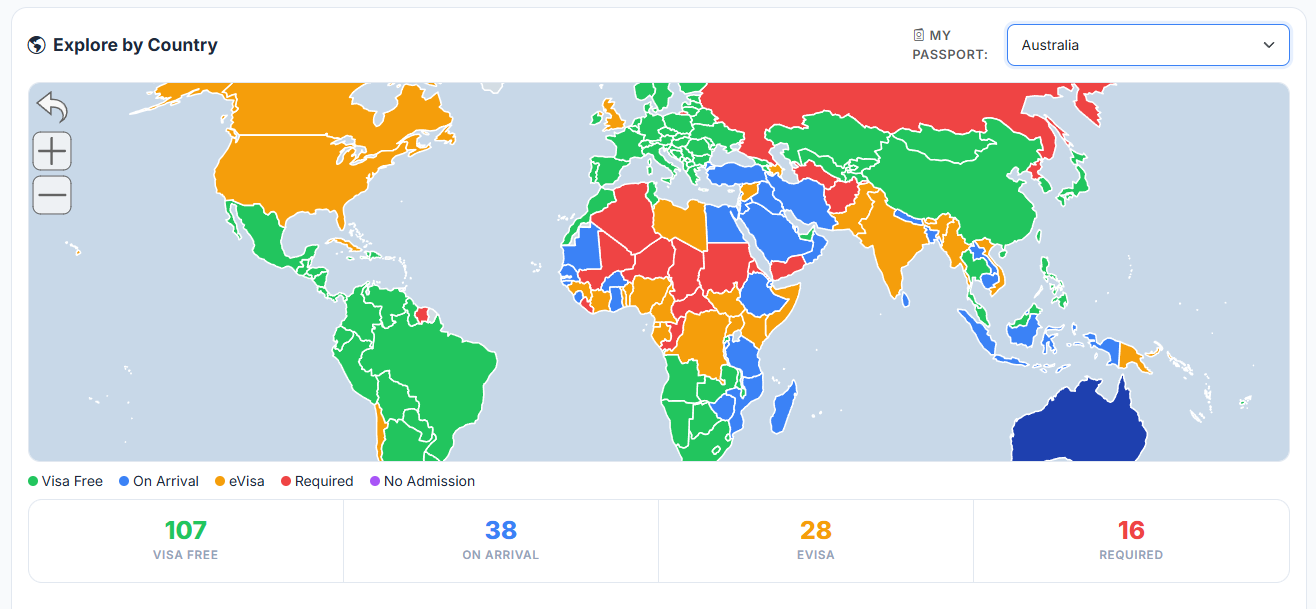
The map starts neutral. The moment you choose a passport, every country repaints to show exactly what you’d need to enter it — and a running count tells you how much of the world is open to you. From there it’s built for browsing: hover for a quick verdict, click for the full picture.
- Passport selector — 190+ nationalities, each with its own visa map.
- Instant recolour — the whole world repaints in one pass on selection.
- Six-state colour key — visa-free, on arrival, eVisa/ETA, visa required, no admission, your country.
- Always-on legend — the colour meanings sit next to the map, never hidden in a menu.
- Hover tooltip — country name plus the visa verdict for your passport.
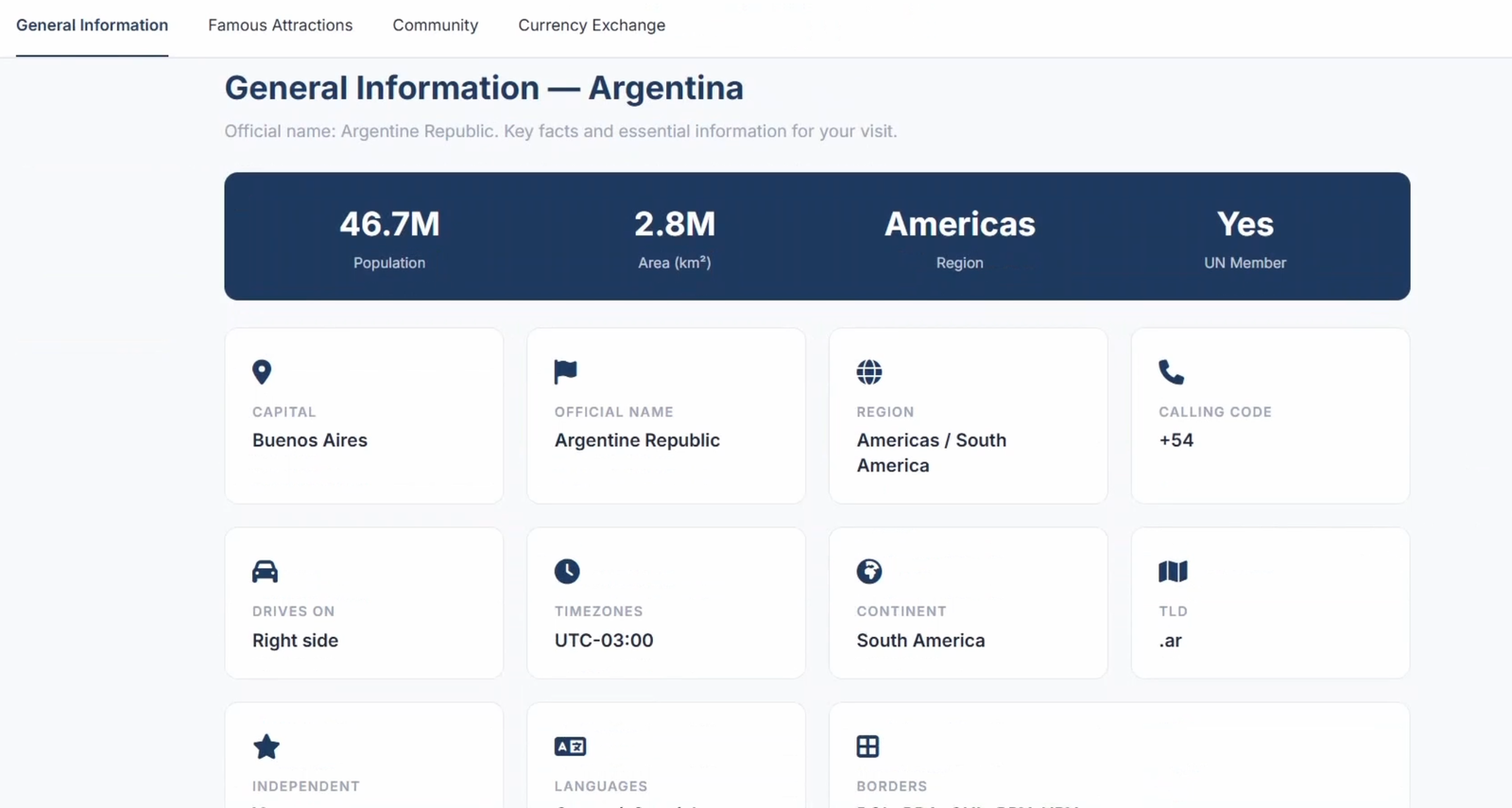
- Click a country — opens a detail panel with flag, capital, region, population, languages and currency.
- Live counts — visa-free / on-arrival / eVisa / required totals update per passport.
- Reset — clears the selection and returns the map to its neutral state.
Try It Yourself — Live Demo
This is the real component, running right here on the page. Pick a passport to colour the map, read the legend for what each colour means, then click any country to see its details.
Interactive Visa Map
Loads a vector world map plus the full passport-index dataset (~1.4 MB). Starts on tap.
Pick a passport to colour every country by its visa requirement.
The map assets couldn’t load. This usually means the demo files aren’t being served alongside the page.
Live component · vanilla JS · SVG vector map · REST Countries enrichment
How It Works — Technical Details
1 · Data pipeline
The source is passport-index-tidy.csv — every
passport → destination → requirement row (~35k). I flatten it into a nested
object, VISA_DATA["Germany"]["Japan"] = "90", shipped as a pre-built JS file so
lookups are O(1) with zero parsing at runtime.
2 · Name ↔ ISO reconciliation
Three data sources spell countries differently (“DR Congo” vs “Democratic Republic of the
Congo” vs CD). A CSV_TO_MAP table plus an ISO index resolves every
name to the map’s country id, so no destination silently falls through to “no data”.
3 · Rendering & recolour
The map is an SVG vector engine. On passport select I reset all state_specific
colours, paint each destination by category, mark the home country, then call one
refresh() — the entire world repaints in a single frame.
4 · Visa classification
Raw values are messy — "visa on arrival", "e-visa", a number of
days, "-1", blank. A classifyVisa() function normalises all of it
into six semantic buckets that drive both colour and copy.
5 · Live country enrichment
Clicking a country fires a request to the REST Countries API for flag, capital, region, population, languages and currencies, merged with the visa verdict from the local dataset.
6 · Interaction hooks
The engine exposes over_state, out_state and
click_state hooks. I use them for the follow-the-cursor tooltip, hover verdict
badges, and opening the country panel.
Features I Implemented
- Passport → world recolour in a single render pass.
- Six-category visa colour system with an always-visible legend.
- Normalisation layer for inconsistent visa strings and country names.
- Pre-compiled dataset for instant, offline-capable lookups.
- Cursor-tracking tooltip with per-passport verdicts.
- Country detail panel with live API enrichment and graceful offline fallback.
- Per-passport statistics (visa-free / on-arrival / eVisa / required).
- Reset control and keyboard-dismissible panel.
- Responsive framing so the map sits in the layout instead of taking the whole screen.
Challenges
Three sources, three spellings
The visa dataset, the SVG map, and the REST Countries API each name countries differently. Getting a fully-painted map meant building and testing a reconciliation table until zero destinations fell through to “no data”.
35,000 rows, instantly
Parsing a 1 MB CSV on every visit was a non-starter. Pre-compiling it into a nested lookup object moved all the cost to build time and made passport switching feel instant.
Readable with 200 countries lit up
Colouring the whole world at once can turn into noise. I settled on six high-contrast categories, a near-white “your country” marker, and a muted “no data” tone so the map stays scannable.
A map that doesn’t eat the page
An SVG world map wants to fill the viewport. I framed it in a fixed, rounded container with its own toolbar, legend and stats so it reads as one component inside the layout.
How the Map Improves the Travel Experience
The map replaces a dense visa table with a single glance. It changes the traveller’s first question from a spreadsheet lookup into an exploration — and every country is a launchpad into the rest of the platform.
“Where can I go?” is answered visually instead of by reading rows of text.
passports supported, each with its own full-world visa picture.
from a country on the map to its complete destination guide.
Lessons Learned
- Most of the work in a “visual” feature is data cleaning — the rendering was the easy 20%.
- Pre-computing at build time beats clever runtime parsing for anything the user waits on.
- A colour system needs an offline “no data” and “home” state designed in from the start, not bolted on.
- Embedding a full-bleed widget in a page is its own design problem — framing, legend and controls have to travel with it.
Project Demo Video
A walkthrough of the full Travel Agent platform recorded during our final-year presentation.